
We provide advanced audio-visual technologies to create future-ready corporate, educational, and healthcare environments.
We provide advanced audio-visual technologies to create future-ready corporate, educational, and healthcare environments.

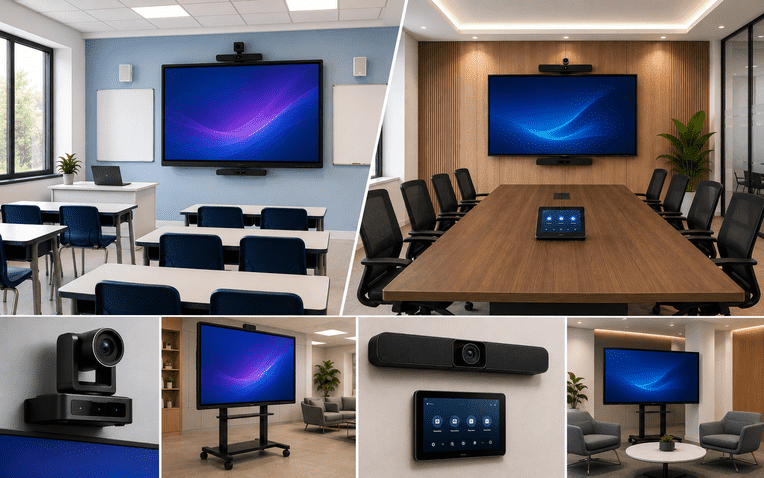
Walk into any modern classroom, boardroom, or office today, and you'll likely spot a large, sleek screen replacing the old whiteboard or projector. This is AV (Audio-Visual) technology in action — and smart displays are at the heart of it.
Whether you're a school looking to upgrade your teaching methods or a business in Bangalore aiming to make meetings more efficient, understanding AV technology is the first step. In this beginner-friendly guide, Homeify Smart breaks down what smart displays are, how they work, and where they're making the biggest impact — from classrooms to boardrooms and beyond.
AV technology refers to the combination of audio and visual equipment used to communicate, present, and collaborate more effectively. This includes:
Modern AV technology has evolved from simple projectors and speakers into fully integrated, smart systems that connect with the cloud, mobile devices, and other office or classroom tools.
A smart display is an interactive screen that goes beyond just showing content — it lets users write, draw, share, and control digital content in real time. Unlike a traditional screen, smart displays are:
Smart displays are now a core part of AV setups in schools, corporate offices, and hybrid workspaces across Bangalore.
In education, smart displays have replaced traditional chalkboards and static projectors. Here's how they help:
Schools across Bangalore are increasingly adopting smart classroom displays to keep up with modern teaching standards and hybrid learning needs.
For businesses, smart displays turn ordinary meeting rooms into efficient, professional collaboration spaces:
Many corporate offices in Bangalore are upgrading their boardrooms with smart displays to support hybrid work and faster decision-making.
Smart display technology isn't limited to schools and offices. It's also used in:
| Feature | Why It Matters |
|---|---|
| Touchscreen Sensitivity | Ensures smooth, accurate writing and navigation |
| 4K Resolution | Delivers sharp, clear visuals for presentations and videos |
| Built-in Camera & Mic | Enables high-quality video conferencing without extra devices |
| Wireless Screen Sharing | Removes the hassle of cables and adapters |
| Multi-OS Compatibility | Works with Windows, Android, iOS, and Mac devices |
| Cloud & App Integration | Connects with Google Workspace, Microsoft 365, and more |
Homeify Smart helps schools and businesses across Bangalore design and install the right AV technology for their spaces. Here's what we offer:
Q1. What is the difference between a smart display and a regular projector? A smart display is interactive and touch-enabled, allowing users to write, share, and collaborate directly on the screen, while a projector only shows visuals without interaction.
Q2. Are smart displays suitable for small meeting rooms? Yes, smart displays come in various sizes, making them suitable for small huddle rooms as well as large boardrooms.
Q3. Can smart displays be used for hybrid classrooms? Yes, most smart displays come with built-in cameras and microphones, making them ideal for connecting in-person and remote students.
Q4. Does Homeify Smart provide installation services in Bangalore? Yes, Homeify Smart offers complete consultation, installation, and support services for AV solutions across Bangalore.
Q5. How much does a smart display setup cost? Costs vary based on screen size, features, and room requirements. Homeify Smart offers customized quotes based on your specific needs.
AV technology and smart displays are reshaping how we teach, collaborate, and communicate — whether in a classroom, boardroom, or beyond. As more schools and businesses in Bangalore embrace digital transformation, investing in the right smart display solution has become essential, not optional.
Ready to upgrade your space with smart AV technology? Homeify Smart offers expert consultation and installation services across Bangalore. Get in touch today for a free assessment.

Delivering advanced audio-visual and smart technology solutions to create future-ready environments.
© Homeify Smart 2026 | All Rights Reserved