

We provide advanced audio-visual technologies to create future-ready corporate, educational, and healthcare environments.
We provide advanced audio-visual technologies to create future-ready corporate, educational, and healthcare environments.

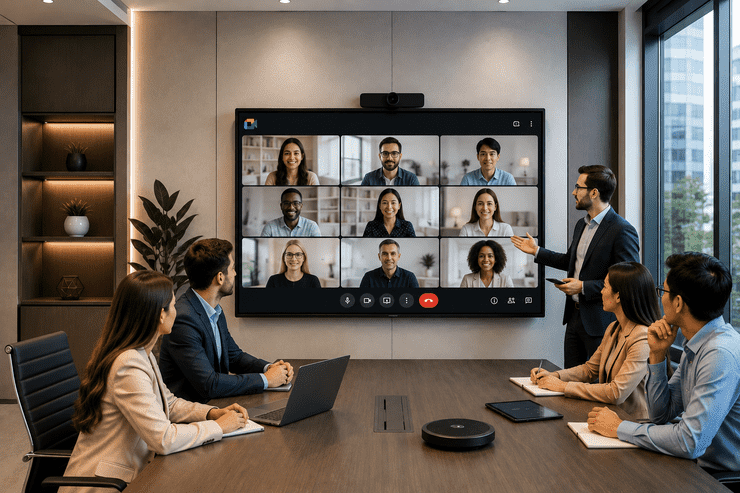
Walk into almost any modern office, and the conference room tells you a lot about how the company works. A dated projector with a tangle of cables signals friction and wasted time. A crisp, responsive display that connects in seconds signals a team that values efficiency. As hybrid work has become the norm, the humble conference room display has quietly turned into one of the most important pieces of office technology.
This guide covers what conference room displays actually are, the different types available, and how to choose the right one for your office — without overspending on features you won't use.
A conference room display is a screen — ranging from a simple large-format TV to a fully interactive touch panel — used to present content, run video calls, and support collaboration during meetings. Unlike home or personal screens, conference room displays are built for group visibility, frequent daily use, and integration with office software and conferencing tools.
Depending on the room's purpose, a display might serve one simple function (screen sharing) or several combined (video calls, whiteboarding, wireless casting, and scheduling).
Essentially large, high-resolution TVs used for presentations and video calls. Cost-effective and simple, ideal for smaller meeting rooms with basic needs.
Touch-enabled panels that support annotation, digital whiteboarding, and app integration — better suited for collaborative sessions, not just presentations.
Displays bundled with built-in cameras, microphones, and speakers, designed specifically for seamless video calls without needing separate equipment.
Two or more screens used together — often one for the video call participants and another for shared content — common in larger boardrooms.
Screens paired with wireless casting technology, allowing anyone in the room to share their laptop or phone screen without cables.
| Feature | Why It Matters |
|---|---|
| Screen Resolution (4K recommended) | Ensures text and shared content stay sharp and readable |
| Built-in or Compatible Camera & Mic | Essential for clear video calls without extra hardware |
| Wireless Casting Support | Speeds up meeting starts by removing cable dependency |
| Touch Interactivity | Useful for rooms used for brainstorming, not just presenting |
| Software Compatibility | Should work smoothly with Zoom, Teams, Google Meet, etc. |
| Mounting & Viewing Angle | Affects visibility for everyone seated in the room |
| Room Type | Recommended Display Setup |
|---|---|
| Small huddle room (2–4 people) | 43"–55" display with built-in camera/mic bar |
| Standard meeting room (5–10 people) | 55"–65" display with wireless casting |
| Large conference room (10–20 people) | 65"–75" interactive display or dual-screen setup |
| Boardroom / executive room | 75"+ display or video wall with premium audio system |
A simple rule of thumb: the display should be comfortably readable from the farthest seat in the room — if people are squinting, the screen is too small for the space.
Homeify Smart helps offices across Bangalore choose, install, and maintain conference room displays suited to how each room is actually used. Our services include:
Q1. What size display is best for a standard meeting room? For a room seating 5–10 people, a 55" to 65" display is generally a good fit, though exact sizing depends on room length and seating layout.
Q2. Do I need a separate camera and microphone, or does the display include them? It depends on the model — some all-in-one video conferencing displays include built-in cameras and mics, while others require separate equipment.
Q3. Are interactive touch displays necessary for every conference room? No, touch interactivity is most valuable for rooms used for brainstorming or collaborative sessions; simpler presentation-only rooms may not need it.
Q4. How does wireless casting improve meeting efficiency? It removes the need for cables and adapters, letting anyone in the room share their screen in seconds instead of spending time connecting devices.
Q5. Does Homeify Smart install conference room displays for offices in Bangalore? Yes, Homeify Smart provides consultation, installation, and ongoing support for conference room display setups across Bangalore.
Conference room displays have moved far beyond simple screens for slideshows — they're now central to how modern offices run meetings, collaborate, and connect hybrid teams. Choosing the right type and size for each room, rather than a one-size-fits-all approach, makes the difference between a display that gets used effortlessly and one that creates friction every time.
Ready to upgrade your office's conference room displays? Homeify Smart offers expert consultation and installation across Bangalore. Get in touch today to find the right setup for your space.

Delivering advanced audio-visual and smart technology solutions to create future-ready environments.
© Homeify Smart 2026 | All Rights Reserved